Case Study 03 · Distribution & Third-Party Logistics

Modern Operations on Top of a Legacy ERP, Without Rip-and-Replace

A live shipment dashboard sitting on top of a decades-old ERP. The team gets to work in a normal modern app, and the business doesn't have to commit to an 18-month rip-and-replace.

The Problem

You can't really replace the ERP, but the way it makes the team work isn't sustainable either.

The Result

A live ops dashboard on top of the legacy ERP. 30+ automated validation checks, per-retailer ship-window math, and everyone working off the same view.

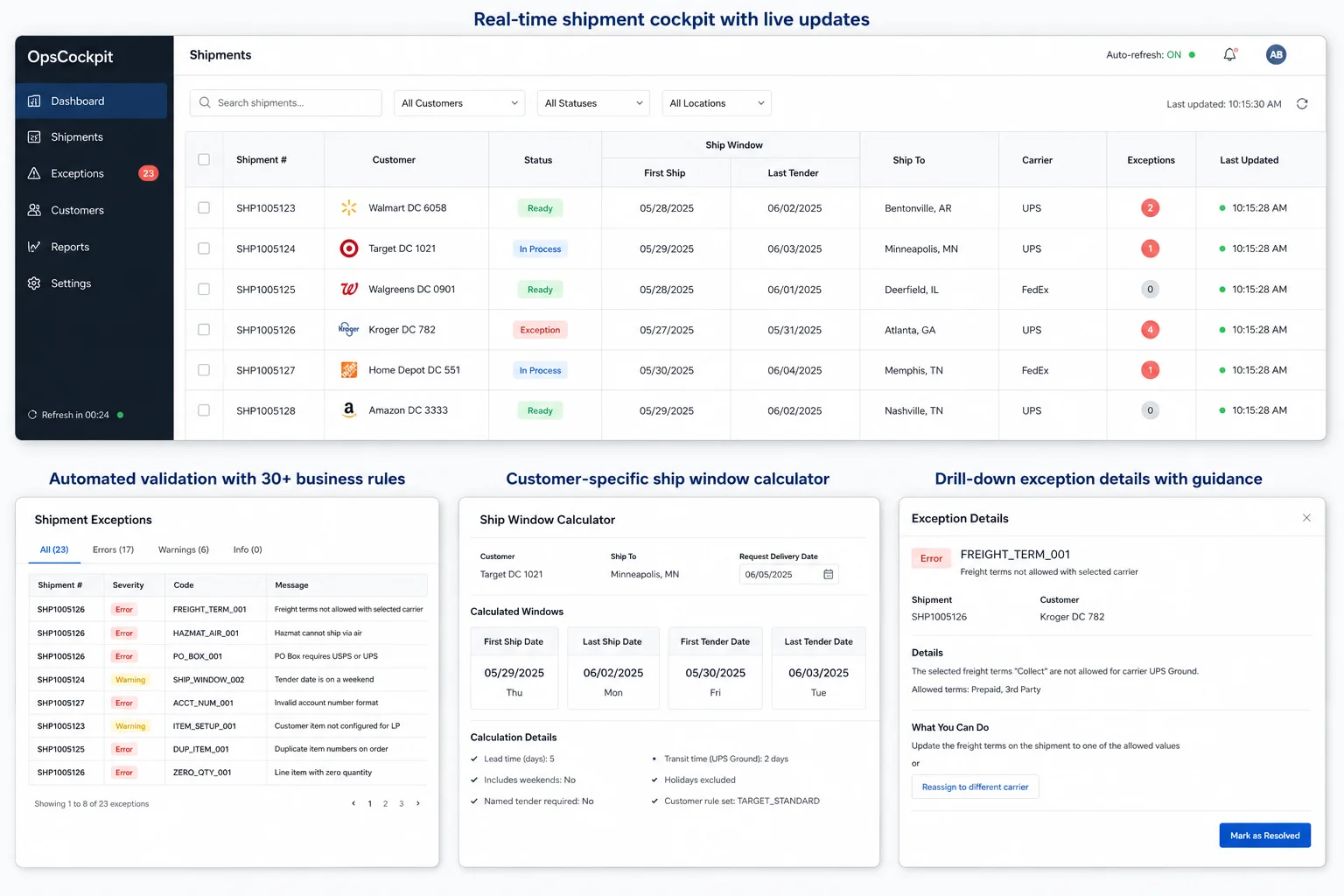
Real-time Ship List grid with validation badges and exception highlighting layered on top of the legacy ERP
  • The legacy ERP stays where it is as the system of record. A modern ops app sits on top, reading orders continuously and showing them in a live grid.
  • 30+ automated checks catch exceptions before they become chargebacks. Things like bad freight terms, PO Box on hazmat, missing customer item setup, zero ship time, the wrong workcenter, and a lot more.
  • A ship-window calculator does the date math for every shipment (first and last ship, first and last tender). It knows the customer-specific cases (Walmart, Target, Walgreens each have their own), UPS transit times, holidays, and weekends.
  • Real-time updates push to every screen over SignalR, so the whole team's looking at the same view at the same time. No more "hang on, let me refresh."
  • Per-customer "acceptable error" rules let the team quiet down noise they've already decided is fine, so the exception queue only shows what actually needs attention.
Results
$0 spent on ERP replacement
30+ validation rules per shipment
~30 sec lag from legacy ERP to live grid
  • Exceptions show up as soon as the data lands, not weeks later when a chargeback hits the mailbox.
  • Every shipment gets re-checked against the rulebook every time something on it changes, so fewer chargebacks slip through.
  • There's no system-of-record migration to do, so training, integrations, and historical data all stay where they are.
  • Onboarding new customers and retailers gets easier. Adding a validation rule or a new ship-window case becomes a normal engineering task.
  • The shadow spreadsheets quietly retire. Once the ops app is the live view, the side-of-desk stuff just stops getting opened.

The system you can't replace is the one holding you back.

If you've been in 3PL for any length of time, you already know the shape of this one. The WMS, TMS, or ERP you've been running for a decade or two is the system of record. It owns the customer master, the orders, the financials, all of it. It isn't going anywhere. Replacing it is an 18-month, seven-figure project with months of dual running, and the upside just doesn't pay back the risk.

The catch is that it was never really designed for the way ops actually runs today. The team needs to see live status across thousands of active shipments at once. Several people need to work the same exception queue without stepping on each other. Every retailer has its own ship-window math and its own definition of "on time." And every retailer has its own list of things you have to validate before tendering (freight terms, hazmat rules, address rules, account-number formats), and a chargeback shows up the moment one of them's wrong.

Doing that work inside a legacy ERP screen is slow. Doing it across the ERP and a pile of spreadsheets is slower, and you pick up errors along the way. The longer it goes on, the more shadow systems show up. Sticky-noted whiteboards, side databases, the inevitable master spreadsheet living in someone's OneDrive. None of them scale, all of them are key-person risks, and they don't really agree with each other.

A modern dashboard that sits on top of the legacy ERP.

A live shipment dashboard sits on top of the legacy ERP. The ERP stays the system of record; we don't touch it. Every thirty seconds or so, a background worker pulls fresh orders into a modern data layer, runs the validation rules, and pushes anything that changed out to every operator's screen. The team works in a normal app, the ERP keeps doing what it does, and the business doesn't have to pay for a rip-and-replace.

Five pieces that made this work.

Step 01

Get the ERP's data into a modern store, live

Situation

Orders, customers, items, and addresses all live inside the legacy ERP, which we can get to over ODBC. The data is authoritative, but reading it straight into modern interfaces every time someone clicks something is slow and chatty.

Task

Get a clean, always-current copy of the orders somewhere the rest of the app can actually work with them.

Action

A background worker pulls new and changed orders every thirty seconds, writes them as Order and Shipment records into a modern SQL Server schema, and keeps customer and address data in sync alongside them.

Result

The legacy ERP is still the system of record. The ops app reads from a modern layer that's never more than a few seconds behind it.

Step 02

Validate every shipment against thirty-plus rules

Situation

Every retailer has its own chargeback rulebook. Freight terms have to match carrier types. Hazmat can't go by air. PO Boxes need a specific carrier. Account numbers have format rules. Some customers want their items pre-configured for label-pack quantities. The list is long and it looks a little different for every retailer.

Task

Catch the violations before the shipment leaves the building, not weeks later when a debit lands.

Action

A shipment validator runs more than thirty checks against every shipment. Things like address completeness, ship and tender date math, customer ship-window rules, freight terms vs. carrier compatibility, hazmat pairing, account-number format, and customer item setup. Every error has a stable code, and the validator re-runs whenever anything on a shipment changes.

Result

The exception queue isn't a guessing game anymore. Anything the rules can catch shows up with a clear code, a message, and the shipment it belongs to.

Step 03

Calculate ship windows the way each customer defines them

Situation

"When does this shipment have to leave?" depends on who's getting it. Some retailers measure the window backwards from a fixed delivery date. Some let the math run through weekends. Some have their own named tenders, like Target's two-day, Walmart's one-day, and Walgreens' rules. And every window still has to respect UPS transit times and the holiday calendar.

Task

Figure out first ship, last ship, first tender, and last tender dates for every shipment, using whichever customer case applies and the right calendar.

Action

A ship-window calculator encodes all of those customer cases and the per-customer carve-outs. It takes the required date, applies whichever math fits, counts UPS business days, skips holidays and weekends, and hands back four dates: first ship, last ship, first tender, last tender.

Result

The ship windows in the ops app line up with the ones each retailer actually enforces. So when someone asks "is this at risk?" the app gives the same answer the retailer would.

Step 04

Push updates live to every screen

Situation

Multiple operators work the same queue at the same time, and a list that's even a refresh out of date is a list where work gets done twice or not at all.

Task

Make sure every operator's looking at the same view at the same time.

Action

The shipment grid is built on ag-Grid with custom validation badges and filtering. A SignalR hub pushes every change (new shipment, validation update, status change) out to every connected client as it happens.

Result

Everyone's looking at the same thing. The race conditions and double-work that come with legacy ERP screens mostly go away.

Step 05

Quiet the noise per customer with "acceptable errors"

Situation

Not every rule applies the same way to every customer. Some retailers explicitly allow things that the generic rule would flag.

Task

Quiet down the noise the team's already decided is fine, without softening the rules for everyone else.

Action

A per-customer "acceptable errors" config lets the team mark specific error codes as fine for specific customers. The validator still runs every check; the filtered output just leaves out the ones the team has already accepted.

Result

The exception queue stays focused, and operators aren't dismissing the same false positive a hundred times a day.

Technical detail (for the engineers in the room)

A .NET 8 API sits on top of the legacy ERP through ODBC. A background worker writes orders into a modern SQL Server schema every thirty seconds or so. The shipment validator handles both per-shipment and cross-shipment rules. The ship-window calculator does the customer-case date math and takes the holiday calendar and UPS transit days as inputs. The React/MUI client uses ag-Grid for the live grid and SignalR for live push.

The stack at a glance:

  • .NET 8 · ODBC · SQL Server pull orders out of the legacy ERP every thirty seconds and write them as Order and Shipment records into the modern operational store
  • Shipment validator runs the thirty-plus per-shipment and cross-shipment rules, with per-customer acceptable-error filtering on the way out
  • Ship-window calculator encodes the per-customer ship and tender date math, and takes the holiday calendar and UPS transit days as inputs
  • ASP.NET Core · SignalR push shipment changes out to every connected client as they happen
  • React · MUI · ag-Grid make up the live operations grid that operators actually work in
Why this matters for your 3PL

Keep the system of record. Change how the team works on top of it.

If you're running on a WMS, TMS, or ERP you can't realistically replace, and your team has built up the usual pile of spreadsheets, dashboards, and side databases just to work around it, our take is to leave the system of record alone. Put a live, validated app on top of it. Get the customer-specific rules out of someone's head and into code. The team gets a normal app to work in, and you stop having the rip-and-replace conversation every quarter.

Stuck with a legacy WMS, TMS, or ERP you can't replace?

Book a free 30-minute call. We'll walk through where your team's working around the legacy system today and what the right modern layer would look like sitting on top of it.

Book Discovery Call
(407) 349-3633