Case Study 04 · Distribution & Third-Party Logistics

Your Team Lives in Your Customers' Portals. We Brought Your Data With Them.

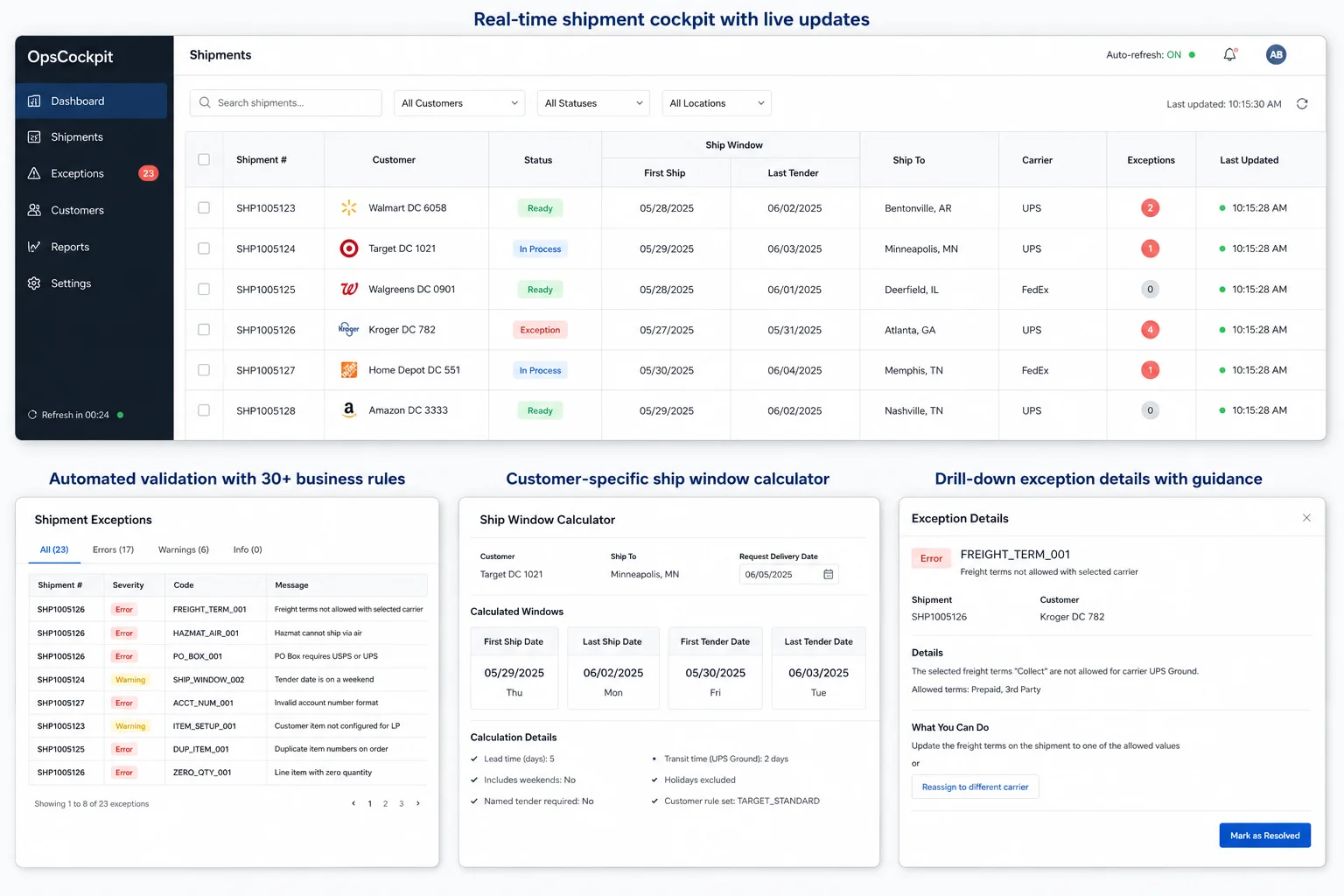
A Chrome extension that runs inside the customer portals your team is already in every day. It highlights the POs that match active shipments, fills in form fields, and drops your shipment data into a side panel so nobody has to alt-tab to find it.

The Problem

Operations staff spend a big part of every day inside ShipIQ and Amazon's portals, copying and pasting data their own system already knows.

The Result

The extension drops your own data into the portal pages, so the operator can see it without flipping back and forth.

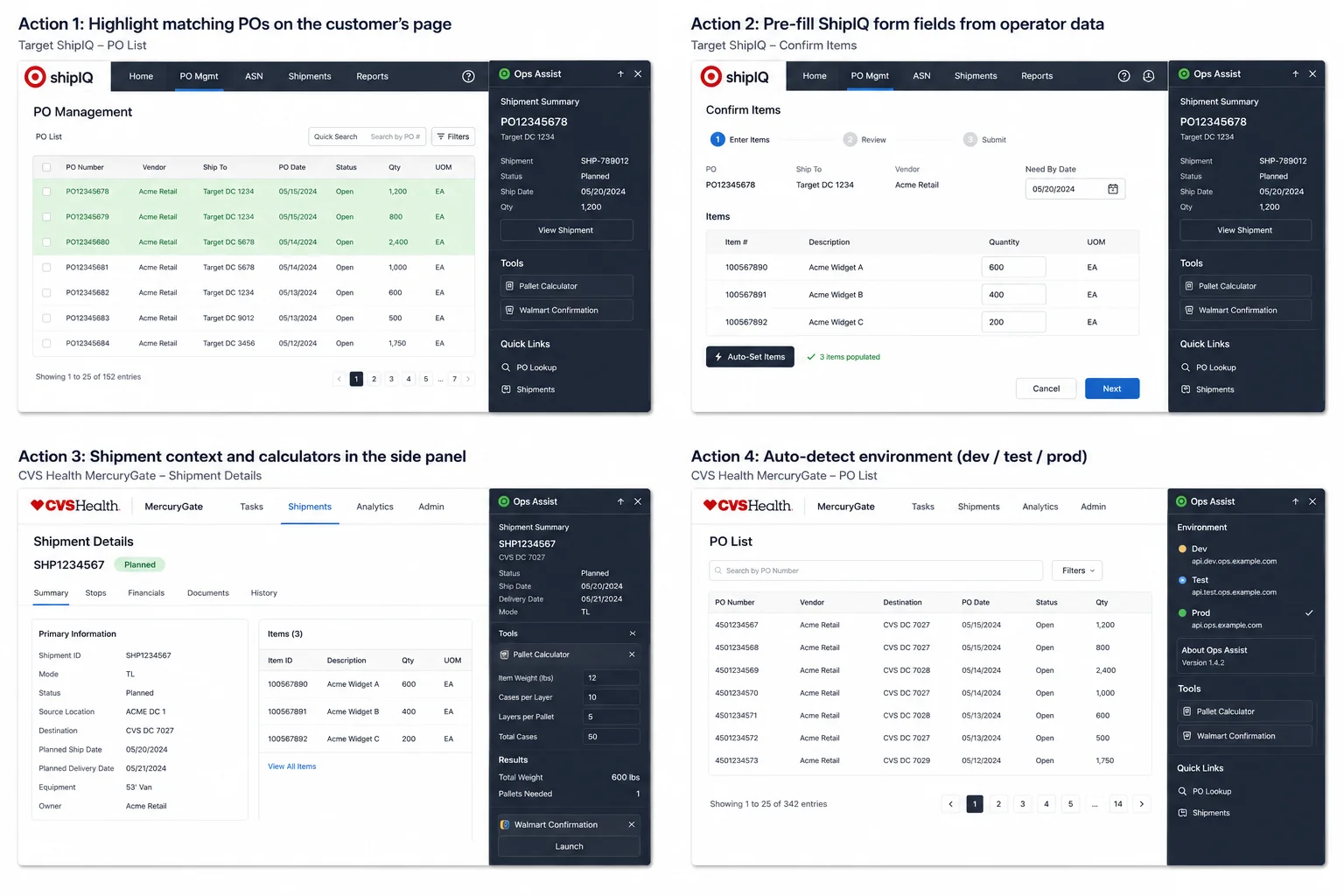
Chrome extension active inside ShipIQ and Amazon Vendor Central, highlighting matching POs and showing shipment data in a docked side panel
  • Runs directly inside the customer portals the team is in every day: ShipIQ (Target / partnersonline), Amazon Vendor Central, and Amazon Seller Central.
  • Highlights POs on the portal page that match active shipments, so the operator can tell at a glance which work has already been touched.
  • Auto-fills ShipIQ form fields from the operator's own shipment data, so the copy-paste round trip basically goes away.
  • A side panel carries shipment context and a couple of calculator utilities (pallet calc, Walmart confirmation) right inside the browser.
  • Auto-detects environment (dev, test, or prod) so the same extension binary works for everyone, and the team can switch back-ends without reinstalling.
Results
3 retailer portals, one signed extension
~2 hrs/operator/day reclaimed
~0 transcription errors on auto-filled fields
  • Real hours back per operator-shift. The small frictions of copy-paste and PO-lookup add up over the course of a day.
  • Fewer transcription errors on retailer portals, because the auto-fill takes out the step where most of those errors were getting introduced in the first place.
  • Faster portal-driven exception handling. When a retailer flags something, the operator can resolve it from inside the portal with their own data already on screen.
  • Lower onboarding cost for new operators. The "two-screen dance" basically goes away.
  • Deployable via Group Policy and updated centrally, so IT isn't chasing down end-user machines one at a time.

Your team isn't in your system. They're in your customer's.

Walk into a 3PL's operations room and watch what the team is actually doing. A lot of the day, they're not in your WMS or your TMS or your ERP. They're in your customers' portals. ShipIQ for Target. Vendor Central for Amazon. Seller Central for the marketplace side. Those portals are the gates the work has to pass through, and they were built for the customer, not for you.

So your operators end up with two screens open most of the day. On one, the customer's portal is asking them to pick a PO, type a date, set a quantity, click submit. On the other, your own system already knows the answers: which shipment that PO is on, when it's planned to ship, the right quantity. The operator copy-pastes, alt-tabs, mistypes a digit, starts over. That happens hundreds of times a day across the floor.

The cost of all this is real, but it doesn't look like one problem you can take to a leadership team. It's a lot of small frictions adding up to real hours and real errors over a week. Nobody really complains about it, because "this is just how the job works." But the time spent flipping between two screens is time the team doesn't spend on the exceptions that actually need a human.
A browser extension that brings your data into your customer's portal.

It's a Chrome extension that runs inside the customer portals the team is already using every day. It reads what's on the page, looks up the matching POs and shipments in your own system, and shows that data right there in the portal. The team stops alt-tabbing.

Four pieces that took the friction tax off the portal day.

Step 01

Highlight matching POs on the customer's page

Situation

An operator lands on a ShipIQ or Amazon page with a long list of POs and has to find the ones that match their active shipments. Until now that meant scrolling, Ctrl+F, and a fair amount of gut feel.

Task

Make the relevant POs visually obvious without making the operator do the work.

Action

Content scripts read the POs displayed on the portal page, ask the operations backend which ones match active shipments, and apply a visual highlight to those rows.

Result

"Where am I in this list?" becomes a glance instead of a scroll.

Step 02

Pre-fill ShipIQ form fields from operator data

Situation

ShipIQ asks the operator to type in fields the operations system already knows: quantities, item identifiers, dates.

Task

Get rid of the typing round-trip.

Action

An auto-fill module reads the ShipIQ form, matches it against the operator's own shipment data, and populates the fields for them.

Result

The transcription step, which is where most of the mistakes were getting introduced anyway, basically disappears for the common cases.

Step 03

Put shipment context and calculators in a side panel inside the browser

Situation

Even with the highlight and the auto-fill, operators occasionally need to look up shipment details, run a pallet calculation, or fill out a Walmart confirmation form.

Task

Keep that work in the browser the portal already lives in, instead of in some other app the operator has to go open.

Action

The extension carries a side panel with shipment status tracking, a pallet calculator UI, and a Walmart-confirmation calculator that's backed by an Excel sheet under the hood.

Result

The supplementary tools live right next to the customer portal instead of in some other window the operator has to go hunt down.

Step 04

Auto-detect dev, test, or prod so the team can switch back-ends without reinstalling

Situation

Operations staff, QA, and developers all need the same extension pointing at different back-ends at different times. Forcing each group to install a different build is fragile and breaks during testing.

Task

Ship one extension binary that everyone uses.

Action

An environment manager inside the extension auto-detects which back-end is reachable and routes API calls accordingly. Users can also flip environments manually from the side panel.

Result

A single signed extension, deployed through Group Policy, that works for everyone. QA can flip it into the test environment without redeploying anything.

Technical detail (for the engineers in the room)

A Manifest V3 Chrome extension with environment auto-detection, a service-worker background script that handles API calls and caching, content scripts that inject into ShipIQ and Amazon's portals, and a Chrome side panel for shipment status and calculator utilities. The whole thing is signed, packaged through the same CI pipeline as the rest of the platform, and deployed to operator workstations through Group Policy.

The stack at a glance:

  • Chrome MV3 · Service Worker runs as the background script, handling API calls to the operations backend and caching responses so the page-side scripts stay snappy
  • ShipIQ content scripts highlight matching POs on the portal page and auto-fill the form fields from the operator's own shipment data
  • Amazon content scripts cover Vendor Central and Seller Central, doing the same kind of highlighting for POs that match active shipments
  • Environment manager figures out which back-end is reachable (dev, test, or prod) and routes API calls accordingly
  • Chrome side panel carries shipment status tracking, a pallet calculator UI, and the Walmart-confirmation calculator
Why this matters for your 3PL

The portals aren't going away. Bring your data with you.

The portals your customers make you use aren't getting better, and every new retail account brings another one. What we built for our client isn't really portal-specific. The same idea works anywhere: figure out which portals are eating your team's time, write a small extension that drops your own data into them, and push it out through Group Policy. That takes the small daily tax of two-screen work off the table.

Watching your team live in customer portals all day?

Book a free 30-minute call. Tell us which portals are eating up the most time, and we'll talk through what a targeted browser extension could do for your operation.

Book Discovery Call
(407) 349-3633